Avelo Mode unlock code for Shearwater air-integrated dive computers
Enable Avelo Mode on your the Shearwater Tern TX, Teric, Peregrine TX or Perdix 2.
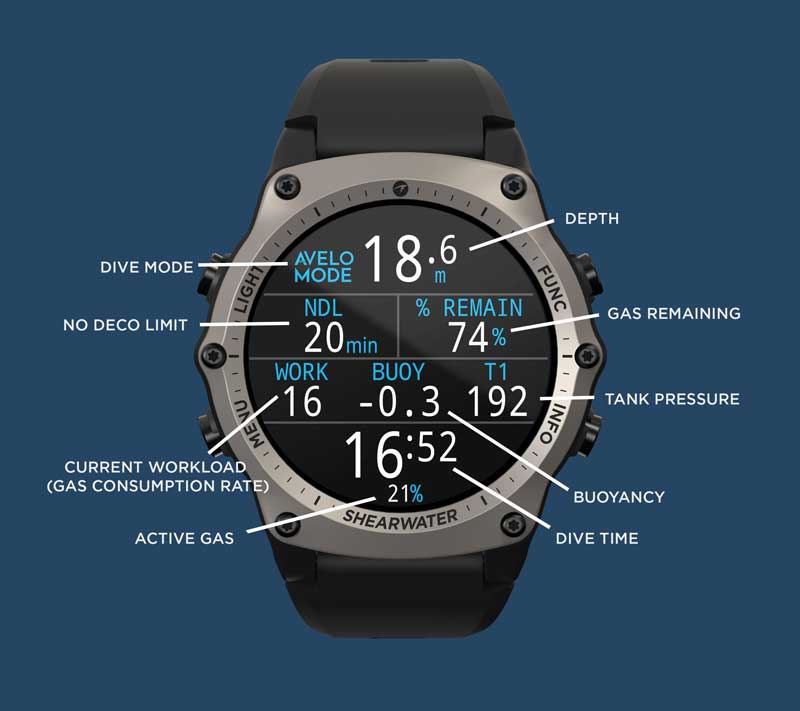
Gain easy visibility of your Avelo dive data and ensure accurate gas time remaining when you enable Avelo Mode on the Tern TX, Teric, Peregrine TX, or Perdix 2 dive computer. Using the Avelo Mode on your Shearwater computer can help enhance safety and overall dive performance through understanding the zone of neutral buoyancy, diver workload and efficiency. Ultimately, divers can experience longer dives and more bottom time compared to diving Avelo alone.
Avelo Mode includes:
Personal/gear/buoyancy setup menu
Gas time remaining as % of starting pressure
Tank pressure
Calculation of your buoyancy status
User input to "clear" buoyancy status to "neutral"
Cloud support for Avelo profiles
Dive shops can send profiles to Avelo dashboard to use as a teaching device
How to enable Avelo Mode
Avelo Mode is only available on a Shearwater Tern TX, Teric, Peregrine TX, or Perdix 2, when paired with a Swift transmitter.
How to find your serial number:
Teric and Tern TX:
Navigate to the Menu – Settings – General – System Info.
Perdix 2 and Peregrine TX:
System Setup - Advanced Config - System Info.
Shearwater will email the Avelo Mode unlock code to Narked at 90, who will pass it onto you.



 Get this free utility knife when your order reaches £100 (ex VAT) or over.